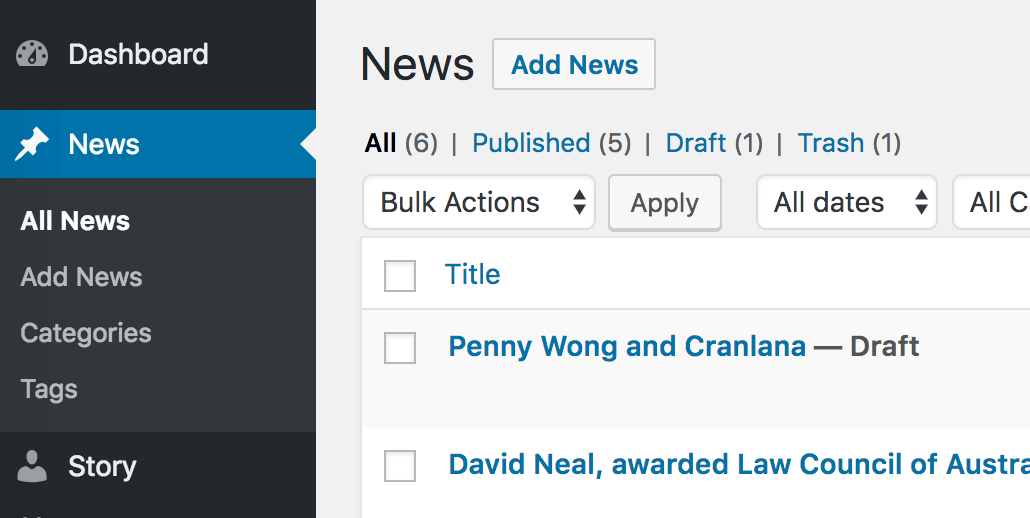
You can change the default Post type name in WordPress from Posts to something else like News using the get_post_type_object, normal behaviour of the Posts occur, just the label name in the WordPress dashboard has been changed.
add_action( 'init', 'cp_change_post_object' );
// Change dashboard Posts to News
function cp_change_post_object() {
    $get_post_type = get_post_type_object('post');
    $labels = $get_post_type->labels;
        $labels->name = 'News';
        $labels->singular_name = 'News';
        $labels->add_new = 'Add News';
        $labels->add_new_item = 'Add News';
        $labels->edit_item = 'Edit News';
        $labels->new_item = 'News';
        $labels->view_item = 'View News';
        $labels->search_items = 'Search News';
        $labels->not_found = 'No News found';
        $labels->not_found_in_trash = 'No News found in Trash';
        $labels->all_items = 'All News';
        $labels->menu_name = 'News';
        $labels->name_admin_bar = 'News';
}
So the ‘post’ type is referenced as the type in get_post_type_object and a $labels variable accesses the labels property – which is then assigned the new values of ‘News’, so instead of using a new CPT you can just rename the default one if it’s not been used.







9 comments
Martin Alejandro Oviedo
Final Code
add_action( 'init', 'cp_change_post_object' );

// Change dashboard Posts to News

function cp_change_post_object() {

$get_post_type = get_post_type_object('post');

$get_post_type->menu_icon = 'dashicons-store';

$labels = $get_post_type->labels;

$labels->name = 'Tiendas';

$labels->singular_name = 'Tienda';

$labels->add_new = 'Nueva Tienda';

$labels->add_new_item = 'agregar nueva Tienda';

$labels->edit_item = 'Editar Tienda';

$labels->new_item = 'Tiendas';

$labels->view_item = 'ver Tiendas';

$labels->search_items = 'Buscar Tiendas';

$labels->not_found = 'No News found';

$labels->not_found_in_trash = 'No News found in Trash';

$labels->all_items = 'Todas las Tiendas';

$labels->menu_name = 'Tiendas';

$labels->name_admin_bar = 'Tiendas';

}
Mehmet
Hello, thank you for the code. I will use this code for Woocommerce. Is there code to change frontend fields as well?
Ajay
nice article, How can we change custom post type permalinks ? could you pls help ..
Al Avery
How would one also go about changing the Title of the “Posts” archive page? Thanks!
Lehel Matyus
Great post, very useful. Just what I needed.
Thank you.
Paul Douglas
Nice function. How then do you change the order, dashicon, and meta? Thank you!
John Regalado
I was wondering the same thing, so for anyone who want’s a follow up it can easily be changed by adding this line of code to the function:
$get_post_type->menu_icon = “ENTER_ICON”;
so for a folder you could use: $get_post_type->menu_icon = “dashicons-portfolio”;
A full list of icons are available here: https://developer.wordpress.org/resource/dashicons
You can reference the get_post_type object here: https://codex.wordpress.org/Function_Reference/get_post_type_object
So the full change would look like this:
add_action( ‘init’, ‘cp_change_post_object’ );
// Change dashboard Posts to News
function cp_change_post_object() {
$get_post_type = get_post_type_object(‘post’);
$labels = $get_post_type->labels;
$labels->name = ‘News’;
$labels->singular_name = ‘News’;
$labels->add_new = ‘Add News’;
$labels->add_new_item = ‘Add News’;
$labels->edit_item = ‘Edit News’;
$labels->new_item = ‘News’;
$labels->view_item = ‘View News’;
$labels->search_items = ‘Search News’;
$labels->not_found = ‘No News found’;
$labels->not_found_in_trash = ‘No News found in Trash’;
$labels->all_items = ‘All News’;
$labels->menu_name = ‘News’;
$labels->name_admin_bar = ‘News’;
// ADDED THIS LINE, but you can put it anywhere in this function as long it as it comes after $get_post_type = get_post_type_object;
$get_post_type->menu_icon = “dashicons-media-document”;
}
Akira
Shouldn’t it be
‘dashicons-media-document’;
and the after $get_post_type = get_post_type_object; isn’t needed
Martin Alejandro Oviedo
add_action( ‘init’, ‘cp_change_post_object’ );
// Change dashboard Posts to News
function cp_change_post_object() {
$get_post_type = get_post_type_object(‘post’);
$get_post_type->menu_icon = ‘dashicons-store’;
$labels = $get_post_type->labels;
$labels->name = ‘Tiendas’;
$labels->singular_name = ‘Tienda’;
$labels->add_new = ‘Nueva Tienda’;
$labels->add_new_item = ‘agregar nueva Tienda’;
$labels->edit_item = ‘Editar Tienda’;
$labels->new_item = ‘Tiendas’;
$labels->view_item = ‘ver Tiendas’;
$labels->search_items = ‘Buscar Tiendas’;
$labels->not_found = ‘No News found’;
$labels->not_found_in_trash = ‘No News found in Trash’;
$labels->all_items = ‘Todas las Tiendas’;
$labels->menu_name = ‘Tiendas’;
$labels->name_admin_bar = ‘Tiendas’;
}